
The Materiality path setting decides how each screened topic reaches its materiality conclusion. Top-down concludes the topic is material at topic level, without scoring each IRO. Bottom-up scores the individual IROs and applies a threshold.
You set the path for each topic, so one analysis can use both. Datamaran doesn't set the path from the topic score. The decision rests on your evidence, and Top-down saves the effort of scoring every IRO when the evidence is already clear.
Why this matters
- Lets you conclude clear-cut topics without scoring each IRO, so your effort goes to the topics that need a full assessment
- Keeps both paths in one analysis, so you can mix Top-down and Bottom-up across topics
- Records a rationale for each top-down decision, which is what an auditor looks for to see how a topic was concluded
- Keeps the conclusion as your own judgment, supported by Datamaran's evidence
Before you start
Set the topic screening interval first. The materiality path is chosen per topic after screening, so a topic needs to be included before you route it. Open the Topic Lens tab and click Set topic screening to do this. See Using the Topic Screening to identify relevant topics.
Run topic screening first to decide which topics move forward. Then, optionally, run a screening survey to collect stakeholder votes. Use the results on each topic's Evidence panel tab to choose its materiality path (top-down or bottom-up), or to confirm a topic you excluded.
Where to set the materiality path
- Open your analysis and go to the Topic Lens tab.
- In the Tornado view, click the bar of the topic you want to route. The topic drawer opens.
- In the drawer header, click the Materiality path dropdown. It shows Materiality path: Bottom-up by default.

How to choose a path
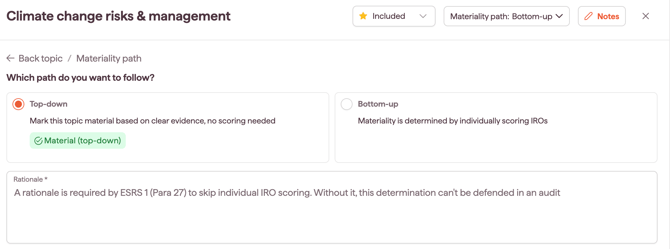
Under Which path do you want to follow?, select one option:
- Top-down: concludes the topic is material at topic level and gives it the status Material (top-down). Use this when the evidence is clear enough to conclude without scoring each IRO.
- Bottom-up: sends the topic through the IRO assessment and threshold. This is the default path.
If you choose Top-down
- Enter a Rationale. This is required. It records why the topic is material without scoring each IRO (as required under ESRS 1, Para 27) and is what supports the decision in an audit.
- If the topic has no IROs linked to it, you see a note that at least one linked IRO is recommended for top-down topics. Consider adding one. See Adding custom IROs or Generating AI's suggested IROs.
- Click Confirm.
Tip: Reference the topic's Evidence panel in your rationale, for example the share of stakeholders who voted the topic material or the share of peers that disclose IROs for it.
What happens after confirming
The message "Materiality path saved" appears, and the drawer header changes to Materiality path: Material (top-down).
To choose which IROs inherit the top-down conclusion, see Concluding a topic top-down and choosing which IROs to assess.
If you choose Bottom-up
Select Bottom-up and click Confirm. The topic keeps the standard flow: identify its IROs, score them with your SMEs, and apply the materiality threshold. See Assessing IROs and their criteria and Defining the IROs materiality thresholds.
How each path shows on the Topic Lens
Each topic carries a status shown in the Topic Lens legend:
- Included Material (top-down): concluded material through the top-down path
- Included: included for bottom-up assessment
- Excluded: screened out
- Undecided: no path decision recorded yet
Changing a topic's path
You can switch a topic's path at any time. Open the topic from the Tornado view, click the Materiality path dropdown, choose the other option and click Confirm. Any IROs already linked to the topic stay linked, so switching from Top-down back to Bottom-up does not lose them.
Note: switching a topic to Top-down does not delete its IROs; they stay linked and can still be reviewed.
Assessing a single IRO within a top-down topic
A top-down topic can still hold individual IROs you want to assess. Those IROs can be left Undecided and scored individually, while the rest of the topic inherits the top-down conclusion. You manage this at IRO level in the IRO Hub.