
You assess IROs when a topic is on the bottom-up path, and for any individual IRO you route to bottom-up from a top-down topic. Topics concluded on the top-down path are decided at topic level and do not need their IROs scored. See Choosing a topic's materiality path: top-down or bottom-up.
The assessment of Impacts, Risks and Opportunities (IROs) is done by each company, using its own understanding of its business and value chain. Subject Matter Experts (SMEs) usually lead this, sometimes with input from relevant stakeholders.
Datamaran's IRO Hub gives you a structured way to score IROs against set criteria. The score then feeds the materiality threshold you set in the Materiality Review tab, which decides whether each assessed IRO is Material or Not material. Until you set thresholds, an assessed IRO shows as Undecided. See Defining the IROs materiality thresholds.
How IROs are scored
Each criterion is scored on a 1 to 5 scale. How the final score is calculated depends on the IRO type and, for impacts, on the Classification you select: actual or potential (ESRS 1 Paras 40–41):
- Risks and opportunities: magnitude and likelihood.
- Actual impacts: the impact is already happening, so likelihood does not apply. Negative impacts are scored on severity. Positive impacts are scored on scale and scope.
- Potential impacts: the impact could happen, so severity is combined with likelihood.
- Human-rights-related potential negative impacts: severity takes precedence over likelihood (ESRS 1 Para 40). See Assessing IROs related to Human Rights.
Severity is based on scale, scope and, for negative impacts only, irremediability. Any one of the three can make a negative impact severe (ESRS 1 AR 22).
Analysis owners can replace the default formulas with their own in Using a custom IRO score methodology, and can also use custom scales.
Criteria for assessment
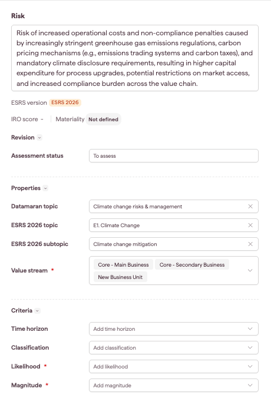
For risks and opportunities:
-
Classification (current / anticipated)
-
Time horizon
-
Magnitude
-
Likelihood
For Impacts:
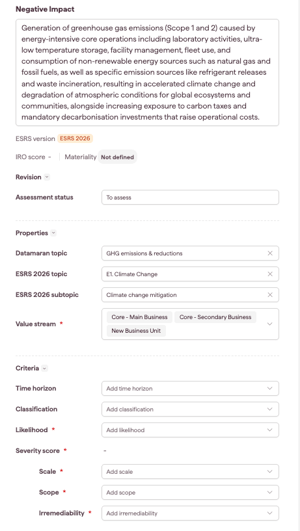
- Classification (actual / potential)
- Time horizon
- Scale
- Scope
- Likelihood (potential impacts, and actual impacts only if your formula uses it)
- Irremediability (negative impacts only)
When the Likelihood field appears for impacts
The Likelihood field on an impact follows the Classification you select and the formula set for actual impacts. This keeps the form to the criteria that count toward the score:
- No classification selected yet: Likelihood is shown.
- Potential: Likelihood is shown.
- Actual, with the default formula or a custom formula that does not use likelihood: Likelihood is hidden.
- Actual, with a custom formula that uses likelihood: Likelihood stays visible, so the score can be calculated.
Note: if you change an impact from potential to actual and Likelihood is hidden, any likelihood score you entered is cleared.
Save your changes as you assess. You can also map IROs to ESRS topics at this stage.
Viewing IROs
Use the filtering options to manage your IRO inventory. For more on assessment scales, contact the Customer Enablement team.