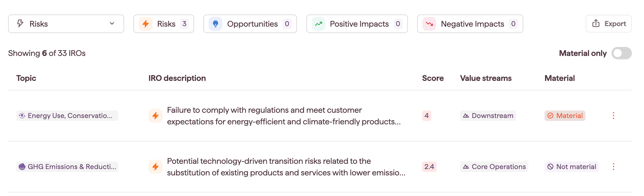
A materiality threshold is the score cut-off that decides which assessed IROs are material and which are not. You set it in the Materiality Review tab, per IRO type, once your IROs have been scored.
Thresholds apply to IROs that are assessed individually: the IROs on bottom-up topics, and any IROs routed to bottom-up from a top-down topic. Topics concluded on the top-down path are not affected by thresholds. Their IROs are labeled Material (top-down) and keep that label whatever threshold you set. See Choosing a topic's materiality path: top-down or bottom-up.
Why this matters
- Sets a clear score cut-off for material IROs, so your reporting focuses on what matters
- Flags IROs close to the cut-off, so you can spot ones that could become material with small changes in the data
- Shows borderline IROs without manual calculation, which speeds up your review
How to define your thresholds
- Go to the Double Materiality module and select your analysis.
- Click the Materiality Review tab to see your scored IROs.
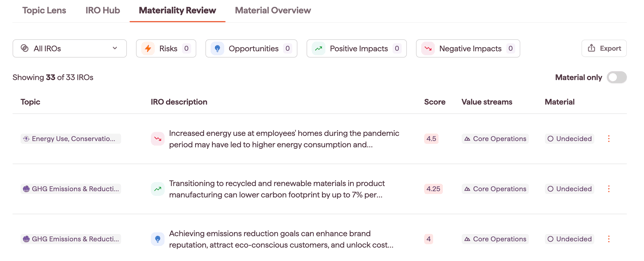
- Select Add thresholds. You can apply up to four thresholds, one for each IRO type: Positive impacts, Negative impacts, Risks and Opportunities.
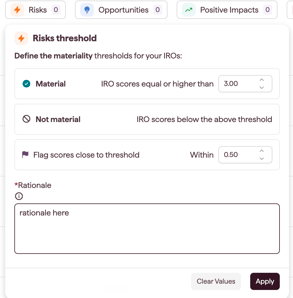
Note: the thresholds are quantitative and depend on the scale from your IRO score formula.
Note: if you change your IRO score formulas or criteria scale, review your thresholds. For example, removing likelihood from the actual impact formulas raises those scores, so IROs close to the threshold may move from Not material to Material. See Using a custom IRO score methodology.
- Set the Close to threshold range (optional). Once you set a threshold value for an IRO type, the modal offers Flag scores close to threshold. To use it, enter your range value in the field.
Note: a "close to threshold" range creates a buffer around your cut-off, so an IRO scoring just below the line is flagged for discussion rather than dropped. - Click Done to apply the changes.
- Review the results. Back on the main screen, Datamaran categorizes your assessed IROs in the Material column:
- Material: scored at or above the threshold
- Not material: scored below the threshold
- Undecided: assessed, but shown until you set the thresholds that decide it
- Material (top down): concluded material on the top-down path, not affected by the threshold
This gives you your preliminary short list of material IROs.
Identifying borderline IROs
If you set the Close to threshold range, you can review borderline IROs to make your assessment more robust.
- If the view is filtered, switch off the Material only toggle to see the full list of IROs.
- Look for the flag icon next to the score of specific IROs. These fall within the range you set in step 4.
- Review these flagged IROs carefully. Because their scores are close to your cut-off, a small shift in data or stakeholder priority could move them between Material and Not material. Use this to decide which topics to discuss in your validation workshops.