
Company Profile is the module where you describe your organization's structure to Datamaran, so the platform can work out which regulations apply to which parts of your business.
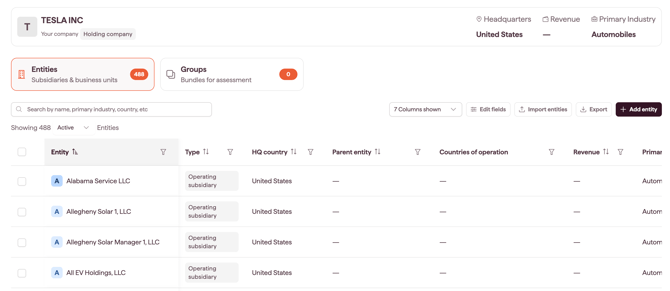
You build that structure out of entities. An entity is any organizational unit you want assessed: a legal subsidiary, a business unit, a regional unit, a joint venture, or a branch. You can then collect entities into groups and run an Applicability Assessment across a whole group in one action.
Why this matters
- Assess regulatory applicability across your full organization, not only the parent company
- Start from pre-filled company data instead of a blank slate, then correct what is wrong
- Organize entities by region, division, or supply chain tier and assess them together
- Keep a record of who changed which entity data, and when
The three things you work with
- Entities are the unit of assessment. Each entity carries a set of standard fields (HQ country, countries of operation, revenue, employee count, and others) that the Applicability Assessment reads when it decides whether a regulation applies. See Entity fields explained.
- Groups are named, flat collections of entities. A group holds no data of its own, it is a selection shortcut. An entity can belong to as many groups as you like: a French subsidiary can sit in both EMEA and Tier-1 suppliers. See Creating and managing groups.
- The audit trail records every change to entity data and group membership: who made it, when, and what changed. See Tracking changes in the audit trail.
Note: groups are always flat. Datamaran does not model parent and child relationships between groups, or nest one entity inside another.
Your entities are created for you
When your account is set up, Datamaran builds your initial entity list for you. You get your parent organization plus every subsidiary that Datamaran can identify from public company data. For a large group, this can run to several hundred entities.
Each entity arrives pre-filled with whatever Datamaran holds for it. Coverage is uneven, by entity and by field: one entity may have an employee count but no revenue, another may have both. Blank fields are yours to complete.
Nothing here is fixed. You can edit, rename, group, or archive any entity, including your parent organization.
Note: pre-filling runs in the background. There is no button to re-trigger it, and a field you edit is not overwritten later by the data source.
Who can do what
Creating and editing
Account Owners, Admins and Editors can create and edit entities, and create and edit groups. The three roles have the same abilities here.
Removing things
Entities and groups are removed in different ways, and both are scoped to what you created.
- Entities are never deleted. To take an entity out of your active list while keeping its data and its assessment history, archive it. You can archive the entities you created. Account Owners can archive any entity. See Archiving an entity.
- Groups can be deleted. You can delete the groups you created. Account Owners can delete any group in the account.
Note: deleting a group does not delete the entities in it. The entities stay in your entity list and in any other groups they belong to.
Entities and groups are visible to everyone in your account, not only to the person who created them.
Running an Applicability Assessment
Every user with access to Regulations can use the Applicability Assessment. You can edit your own assessments, and view other users' without editing them.
How Company Profile feeds Applicability Assessment
The Applicability Assessment reads entity data directly. The quality of a determination depends on the quality of the profile behind it: an entity with a blank Countries of operation field leaves the assessment with nothing to work with for jurisdiction-based rules.
Before running an assessment, review your entities and fill the gaps. See Preparing your Company Profile for an Applicability Assessment.