
Archiving takes an entity out of your active list while keeping its data and its assessment history. Entities are never permanently deleted.
Archive an entity when it no longer needs assessing: it has been divested, merged into another unit, dissolved, or restructured out of existence.
Why this matters
- Keep your active entity list to the units you actually assess
- Retain the assessment history for an entity you no longer own, for audit purposes
- Record why an entity left the structure, and when
Who can archive an entity
You can archive the entities you created. Account Owners can archive any entity in the account, whoever created it.
If you need an entity archived that you did not create, ask an Account Owner.
How to archive an entity
There are two ways, both starting from the entity list.
Archive several entities at once
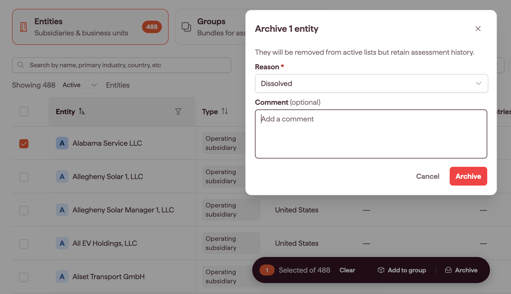
- Tick the entities you want to archive.
- At the bottom of the page, click Archive.
You give the reason once and it applies to every entity you selected, so group your selection by why they are leaving rather than archiving everything in one pass.
Note: unless you are an Account Owner, a multi-select can only archive entities you created.
Tip: the same action bar also offers Add to group, so the multi-select is how you build out a group as well as how you archive. See Creating and managing groups.
Archive one entity from its details
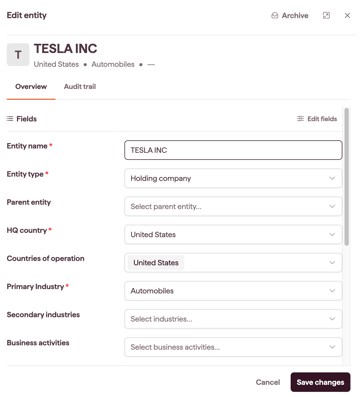
- Click the entity name. A side panel opens showing the entity's fields and their values.
- Click Archive at the top of the panel.
What you are asked for
Archiving records why the entity left your structure.
- Reason. Required. Select the one that fits.
- Comment. Optional. Explain the change in your own words.
Tip: only the reason is required, but the comment and date are what make the record useful a year later. A reason on its own does not tell a colleague when the divestment completed or which deal it belonged to.
What happens after archiving
- The entity is no longer shown in the default entity list
- Its assessment history is retained and remains viewable
- It is removed from any groups it belonged to, and those groups' entity counts drop
- The archive action is recorded in the audit trail with the actor, timestamp, reason, comment and date
Note: archiving does not change past assessment results. A determination made while the entity was active stays as it was.
How to see archived entities
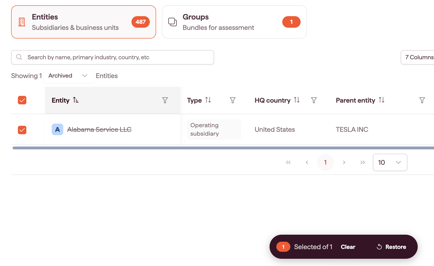
The entity list shows active entities by default. Change the filter from Active to Archived and the list refreshes to show everything you have archived.
How to restore an archived entity
- In the entity list, change the filter to Archived.
- Tick the entities you want to restore. You can select more than one.
- At the bottom of the page, click Restore.
The entities return to your active list.
Why there is no delete
Entities carry assessment history, and that history is part of your compliance record. Permanently deleting an entity would remove evidence of an applicability decision you may need to explain later. Archiving keeps the record and removes the entity from day-to-day work.
No role can delete an entity, including an Account Owner. Groups are different: a group can be deleted, and deleting it leaves its entities in place. See Creating and managing groups.