
The audit trail records every change made to your entity data and group membership: who made it, when, and what the value was before and after.
Entries cannot be edited or removed, by anyone.
Why this matters
- Show where an entity figure came from when someone challenges a determination
- See who corrected a piece of pre-filled data, and when
- Satisfy internal governance requirements on change control
- Trace an unexpected assessment result back to the profile change behind it
What is recorded
Every action that changes data is logged:
- creating an entity, including entities created automatically at account setup and entities created via bulk import
- editing any entity field
- archiving an entity
- restoring an archived entity
- creating or renaming a group
- adding an entity to a group, or removing one
- adding, editing or deleting a custom field value
Each entry carries the actor, the timestamp, and the field that changed. Where the change was made by the system rather than a person, the entry records it as a system action.
Note: a bulk import is recorded as a single action covering every entity and field it touched, not as one entry per cell.
How to see the changes on one entity
- Open Company Profile and click the entity.
- Open the Audit trail tab.
You see every change made to that entity, most recent first.
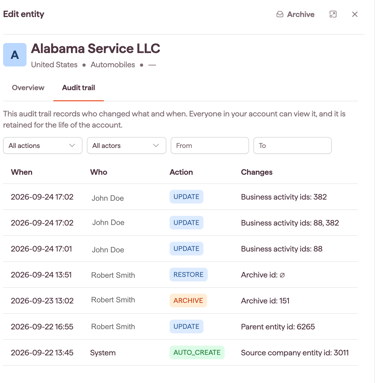
Filtering the log
Use the available filters:
- Actions by type: show changes by type
- Actor: show changes made by one person
- Date range: show changes between a period
What the audit trail does not do
- It does not restore a previous value. To undo a change, edit the field back
- It does not cover assessment results. Determinations, SME assignments and review statuses are recorded in the Applicability Assessment, not here
- Entries are permanent. They cannot be edited or deleted, including by an Account Owner