
Entities are the organizational units Datamaran assesses. Add one for every subsidiary, business unit, regional unit, joint venture, or branch you want included in an Applicability Assessment.
Why this matters
- Build the organizational structure the Applicability Assessment runs against
- Let Datamaran pre-fill what it can, so you only correct the rest
- Keep entity data current as your organization changes
- Record every correction, so you can show where a number came from
How to add an entity
- Open Company Profile from the account menu. See Finding and navigating Company Profile.
- Click Add entity in the top-right side of the table.
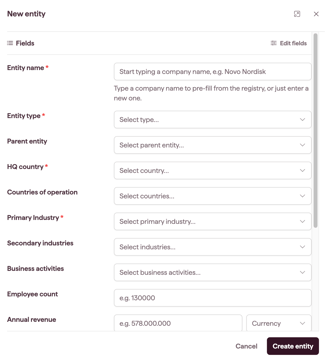
- Enter the Entity name. Names must be unique within your account.
- Enter HQ country and Primary Industry. These are required.
- Complete the remaining fields you have to hand. See Entity fields explained.
- Click Save.
How to edit an entity
- In the entity list, click the entity name. A side panel opens showing the entity's fields and their values.
- Update the fields.
- Click Save.
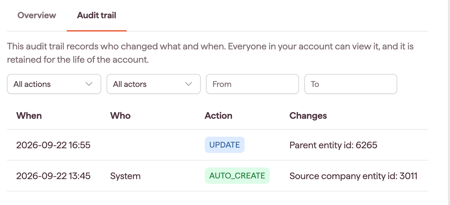
The change applies to that entity only. Every edit is recorded in the audit trail with the person who made it, the timestamp, and the previous and new values.
Note: Account Owners, Admins and Editors can create and edit entities. The three roles have the same abilities here.
Editing a pre-filled field
Pre-filled fields are editable. Once you change one, your value stands: background data refreshes do not overwrite it.
Editing several entities at once
There is no bulk edit screen. To change the same field across many entities, export the entity list to Excel, edit the file, and re-import it.
Changes flow both ways. An edit you make in the platform appears in your next export, and an edit you make in the file appears in the platform once you import. See Importing and exporting entities in bulk.
Removing an entity
Entities are never deleted. To take one out of your active list while keeping its assessment history, archive it. You can archive the entities you created; Account Owners can archive any entity.See Archiving an entity.
Groups work differently. A group can be deleted, and deleting it leaves its entities untouched. See Creating and managing groups.