
Full-text search lets you search the full body of every regulation in Datamaran's database, not just titles and summaries. Use it to find regulations that reference specific terms, phrases, or concepts that don't map neatly to a topic or filter.
Full-text search is available in both Overview (when building the scope of a View) and Research (when exploring the database openly). It can be used on its own or combined with any filter.
Why this matters
- Search every word of every regulation, not just titles and summaries
- Find regulations that reference specific terminology (for example, "eco-modulation", "due diligence", "scope 3")
- Combine free-text search with additional filters for precision
- Navigate within a long regulation by keyword to find the relevant passage
Where to find full-text search
Full-text search is available in two places:
- In Overview, when building the scope of a View. Enter a text query alongside your other filters before saving the View. See Saving a view and switching on notifications.
- In Research, when exploring the database openly. The text search field sits alongside Add filters on the Research page. See Using filters.
In both cases, the text query is a separate field, not part of the filter list opened via Add filters.
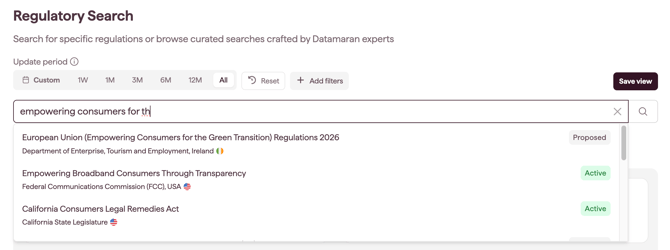
Matches shown as you type
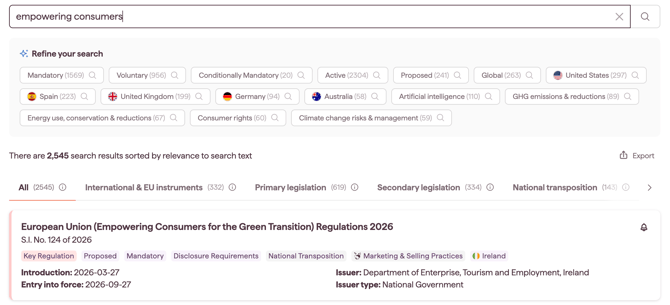
In Research, as you type in the search field, the highest-relevance regulations appear directly below it. Click one to open it, or run the full search to explore everything that matches. For the full search-suggestions flow, including the Refine your search filter suggestions, see Research.
Note: the matches shown as you type are powered by a different search engine from the full regulation search, so they may not return identical results.
How full-text search works
When you enter a text query, the platform searches every word of every regulation in scope, including:
- the regulation title and common name
- the regulation summary
- the full body of the legal text
Non-English regulations are translated into English at ingestion, so the search index covers regulations across every jurisdiction in Datamaran's coverage. Always search using English keywords, even when looking for regulations from non-English-speaking jurisdictions.
How results are ranked
When a text query is included, results are sorted by relevance. The ranking takes into account:
- how well the query matches the full text of each regulation (the primary factor)
- recency, with more recently updated regulations ranked higher
- high-importance fields — matches in the title, common name, or description boost a result more than matches elsewhere in the legal text
Without a text query, results are sorted by most recently updated by default. See Using filters for guidance on the default sort behaviour.
Whether sorted by relevance or by update date, results are grouped into the document type tabs. Ranking applies within the selected tab, and the All tab ranks matches across all document types. See Using filters and Regulations: Concepts and definitions.
Within a regulation: the Full Text tab
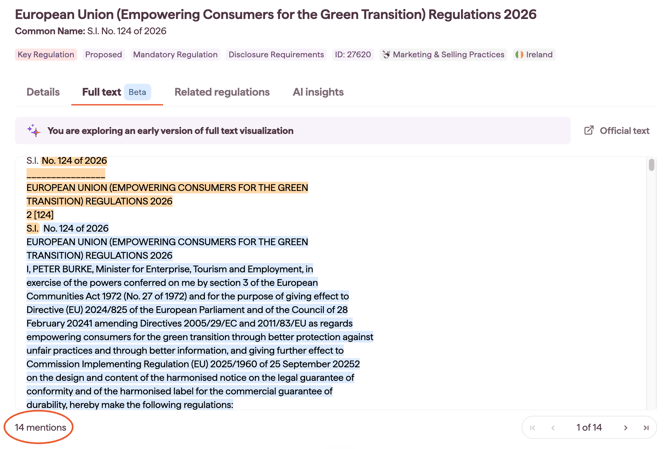
Once you open a single regulation, the Full Text tab gives you the complete legal text of the regulation. Use it to read the original wording, verify how a specific provision is phrased, or trace where your search terms appear. Browse through the findings with the navigation buttons at the bottom right side of the tab.
Tips for effective text queries
- Start broad, then narrow. A single keyword surfaces more regulations than a long phrase. Add specificity only when the initial results are unmanageable.
- Use the actual regulatory terminology. Search for "due diligence" rather than "checking suppliers"; "disclosure" rather than "reporting". Regulations use precise legal language.
- Combine with filters. A text query plus a country or topic filter is usually more precise than text alone. See Using filters.
- Search in English. Non-English regulations are translated at ingestion, so English keywords work across every jurisdiction. Searching in another language will not return non-English-origin regulations.
- Use the Full Text tab for verification. Once you open a regulation, the Full Text tab is the fastest way to confirm that your search term appears in the relevant context.
Saving a text query as a View
If a text query consistently returns useful results, save it as a View so it appears in Monitoring with optional email notifications. See Research: open-ended exploration of the regulatory database for the Save View flow.