
Save a View to preserve your current selections in Overview (filters and any text query) under a name, with optional email notifications. Saved Views appear in Monitoring, where you and your colleagues return to track what has changed.
A View is the unit of value in the Regulations module. Saving one turns a one-off filter setup into something reusable, shareable, and (optionally) self-notifying. You can save a View from Overview when building your monitoring universe, or from Research when a query you ran turns out to be worth tracking.
Why this matters
- Preserve your monitoring setup once, instead of rebuilding filters each visit
- Receive email alerts when new regulations match your criteria
- Share your monitoring setup with your team automatically: every View is visible to your whole workspace
- Separate different monitoring perspectives (global, regional, topic-specific) into distinct, named Views
Before you save
Make sure your Overview is configured the way you want it. Check:
- the countries you want to monitor
- the industries selected, and whether Cross-Sectoral Match is on
- additional filters and any text query
How to save a View
- With your filters set in Overview, click Save View.

- In the dialog, enter a clear, descriptive name for the View (e.g. "EU: Eco-modulation", "Global: Human Rights Watchlist", "UK: Disclosure Requirements").
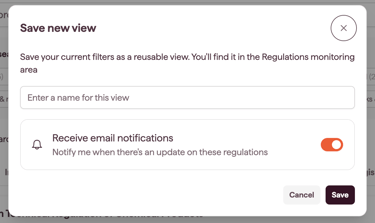
- To receive email alerts when new regulations match your criteria, switch on Receive email notifications.
- Click Save.
What happens after saving
- Your View appears immediately in Monitoring, alongside any Views your colleagues have created.
- If Email notifications are switched on, you will receive an email when new regulations match your criteria. To manage the frequency, refer to Managing Your Notification Preferences
- Other users in your workspace can see and use the View. They will not receive email notifications unless they save their own copy and switch notifications on.
Naming your Views
Names are visible to your whole team, so they should make sense to colleagues who didn't build the View. Good names include both the scope and the angle:
- "EU: Eco-modulation"
- "Global: Human Rights Watchlist"
- "UK: Disclosure Requirements"
- "US States: PFAS"
Avoid generic names like "Monitoring 1" or "Test View". They make the workspace harder to navigate as more Views accumulate.
Switching notifications on or off later
You can switch Email notifications on or off for any View directly from Monitoring, without re-opening it in Overview. See Managing your Views in Monitoring.
Updating a saved View
If you add new filters to an existing View, you can:
- Save the update View as a new View
- Save changes in current View to update the filters

Notes on how this feature is designed
- Views are workspace-visible by default. This is deliberate: it lets colleagues build on each other's monitoring work and avoids duplicate setups.
- Email notifications are configured per user, not per View. To receive alerts for a colleague's View, save your own copy with notifications switched on.