
Research is the discovery layer of the Regulations module. Use it for open-ended exploration of the full regulatory database, to load Expert Curated Searches built by Datamaran, and to identify regulatory developments that sit outside the scope of your existing Views.
Where Overview and Monitoring are about staying on top of what you already know matters, Research is where you go to find what you don't yet know matters.
Why this matters
- Explore beyond the boundaries of your saved Views when a new topic, country, or topic surfaces
- Use Datamaran's expert-curated queries on significant regulatory packages (such as CSRD readiness, PFAS, or EU Omnibus) without building queries from scratch
- Run ad-hoc filtering across the full regulatory database
- Fold valuable findings back into Monitoring by saving a Research query as a View
Where to find Research
- In the main menu, select Regulations.
- Click Research.
When to use Research
Reach for Research when:
- A new topic, country, or theme comes up that is not covered by any existing View
- A peer, regulator, or news headline raises something you want to sanity-check against the database
- You want to start from one of Datamaran's expert-curated queries instead of building your own from scratch
- You need to export a set of regulations for a one-off briefing or analysis
For ongoing monitoring of a defined scope, use Overview to build a View instead. See Build your monitoring universe in Overview.
What you can do in Research
Research is the most flexible surface in the Regulations module. From here you can:
- Filter the regulatory database. Combine country, industry, topic, status, enforcement level, sanctions, disclosure, issuer, targeted entity, and update window. See Using filters.
- Run a full-text search. Search the full body of every regulation, with results ranked by relevance and recency. See Using full-text search
- Load an Expert Curated Search. Apply a pre-built query created by Datamaran's regulatory team. See Using Expert Curated Searches.
- Save your query as a View. Turn any Research query (including a curated search) into a saved View that appears in Monitoring alongside your other Views.
- Export results. Export the regulations list to Excel for distribution to legal, compliance, or governance committees.
Search suggestions
As you type in the search field in Research, a list of the highest-relevance regulations appears below the field. These are the most relevant matches to what you have typed, not the full search. From here you can either:
Click one of the listed regulations to open it directly, without running the full search.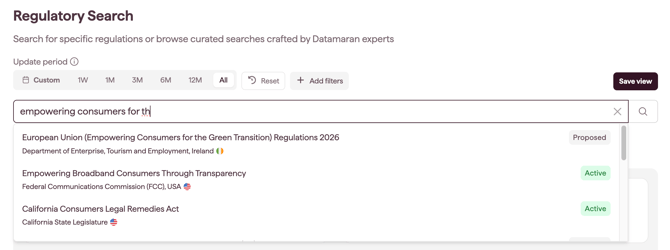
- Click the search (magnifying glass) icon to run the full search across every matching regulation.
Refine your search
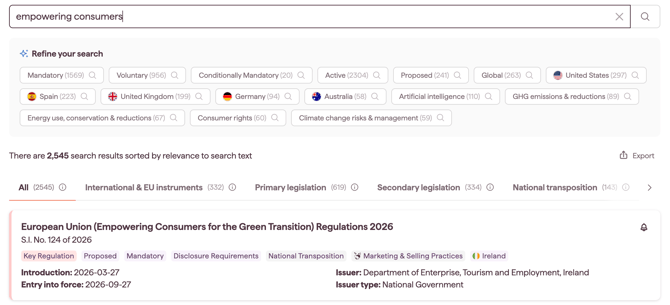
Once you run the search and the first results load, a Refine your search box appears below the search field with suggested filters for narrowing your results.
The box surfaces the most relevant filters you can apply, eg. enforcement types, statuses, and geographies for your current results. Each suggestion shows a count of matching regulations, so you can see how far it would narrow the list before you apply it.
Select one or more suggestions. The results update as you select them, and each selected suggestion is added to your active filters in the filters section, exactly as if you had added it from Add filters. You can adjust or remove these filters the same way as any other. See Using filters.
Note: Refine your search appears only once you have a result set. Applying a filter first also produces results, so the suggestions appear that way too. Tip: apply the highest-count suggestion first to make the biggest cut, then refine from there.
Organise results by document type
Results are organised into tabs by document type, so you can separate the source law from the national measures that implement it or from non-binding guidance. Each regulation is placed in a tab automatically, based on its own metadata. The All tab shows every result across all document types, and is the default.
The tabs are:
- International & EU Instruments: supranational law (treaties, conventions, and EU/EEA acts)
- Primary Legislation: foundational statutes enacted by a legislature
- Secondary Legislation: executive and regulator instruments made under powers delegated by primary law
- National Transposition: a national measure that gives a higher instrument domestic legal effect
- Implementing Measures: national secondary rules that operationalise a parent instrument
- Guidance & Standards: non-binding guidance and standard-setting (guidelines, standards, frameworks, and codes)
- Policy, Strategies & Reports: voluntary policy direction and analysis (strategies, policies, action plans, roadmaps, reports, and position or white papers)
For the full definition of each document type, see Regulations: Concepts and definitions.
Note: the document type tabs appear on any results list in the Regulations module. Your filters and text query still apply within the selected tab.
From Discover to Monitor
Research is most valuable when it leads somewhere. If a Research query turns up regulations that matter to your business, save it as a View:
- With your Research query active, click Save View.
- Give the View a clear, descriptive name.
- Switch on Receive email notifications if you want to be alerted when new regulations match the criteria.
- Click Save.
The View appears immediately in Monitoring, alongside your other saved Views. From that point on, it is no longer a one-off Research query but part of your ongoing monitoring universe.
Tip: Expert Curated Searches are the fastest way to put this handoff into practice. Pick one that maps to a known priority (CSRD if you focus on sustainability reporting, PFAS for product or chemicals teams) and save it as a View on the spot.
Notes on how this feature is designed
- Research operates against the same regulatory database as Overview and Monitoring. The difference is the entry point: Overview is structured around building a monitoring universe, Research is structured around open exploration.
- A View saved from Research behaves the same as a View saved from Overview. Both appear in Monitoring, support email notifications, and are visible to your entire workspace.