
Expert Curated Searches are pre-built queries created by Datamaran's regulatory team. Each one captures a significant or emerging regulatory theme (such as CSRD, ISSB, or EU Omnibus) and applies the right combination of filters and text logic on your behalf.
Use them to explore complex regulatory topics without building a query from scratch, and to identify whether a theme is worth folding into your ongoing monitoring as a saved View.
Why this matters
- Access pre-built queries for significant regulatory packages without needing to know the right keywords, citations, or jargon
- Benefit from Datamaran's regulatory experts directly inside the platform
- Get high-quality results immediately, instead of building and testing filters
- Identify themes worth monitoring on an ongoing basis, then save them as Views
Where to find Expert Curated Searches
- In the main menu, select Regulations.
- Click Research.
- See the Expert-Curated Searches.
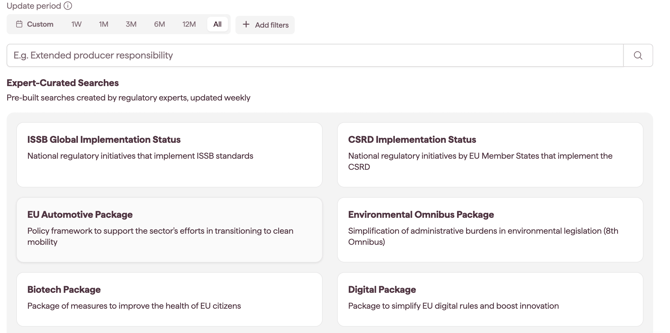
How to use an Expert Curated Search
- Open Expert Curated Searches and browse the available queries.
- Select one. The platform applies the curated filter set and surfaces the matching regulations.
- Review the results.
- Refine further if needed: add a country, a topic, or a text query to narrow the scope.
Note: curated results are organised into the document type tabs, the same as any other results list. See Research.
When to use Expert Curated Searches
Expert Curated Searches are particularly useful:
- early in your work with the platform, before you have built custom Views
- when a new regulatory theme appears in the news and you want to sanity-check it quickly
- when a colleague, regulator, or stakeholder raises a topic you haven't tracked before
- when you need a fast, expert-built starting point for a briefing or analysis
Saving a curated search as a View
If a curated search reflects something you want to monitor on an ongoing basis, save it as a View so it appears in Monitoring alongside your other Views.
- With the curated search open, click Save view.
- Give the View a clear, descriptive name (e.g. "CSRD Readiness").
- Switch on Receive email notifications if you want to be alerted when new regulations are added to the curated search.
- Click Save.
The View appears immediately in Monitoring. From that point on, it is no longer a one-off curated search but part of your ongoing monitoring universe. See Saving a View and switching on notifications for the full Save View flow.
Tip: Expert Curated Searches are the fastest way to put Discover into practice. Pick one that maps to a known priority and save it as a View on the spot.
Notes on how this feature is designed
- Curated searches are created and maintained by Datamaran's regulatory team.
- A View saved from a curated search behaves the same as any other View. It appears in Monitoring, supports email notifications, and is visible to your whole workspace.