
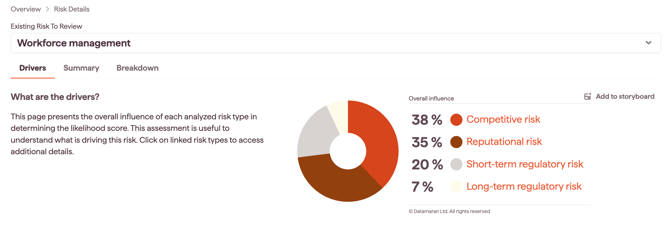
The Drivers tab shows what is driving a risk: how much each source contributes to the risk's Likelihood score, shown as an Overall Influence percentage.
To open it, select a risk on the Overview tab, then choose the Drivers tab.
Why this matters
- See which type of source is pushing a risk's likelihood up, not just how high it is
- Assign each risk to the right internal team based on what drives it
- Tell apart risks that share a likelihood score but come from different drivers
- inform how you mitigate each risk and where you set your risk appetite
The four driver categories
Each risk breaks down into four drivers, each based on a different source:
- Competitive Risk: based on corporate reporting analysis. See Understanding the Competitive risk driver
- Short-term Regulatory Risk: based on hard law analysis. See Understanding the Short-term Regulatory risk driver
- Long-term Regulatory Risk: based on soft norms analysis. See Understanding the Long-term Regulatory risk driver
- Reputational Risk: based on online news analysis. See Understanding the Reputational risk driver
How to use the Overall Influence
The Overall Influence tells you what is driving a risk, which helps you decide how to handle it.
Assign a risk owner
- Mainly Regulatory (short-term or long-term): your compliance team is best placed to address it
- Mainly Reputational: inform your communications team to watch for further signs and take preventative measures
- Mainly Competitive: your strategy and leadership team should assess how to address it, and look for opportunities
Plan mitigation
Most risks have more than one driver, so mitigation usually needs a mix. For example, added R&D, a new employee policy, a stronger communications policy, or extra compliance controls.
Prioritise
Two risks with a similar likelihood can be told apart by their drivers. For example, you might give a short-term regulatory influence priority over a long-term one.
Set risk appetite
The mix of drivers can shape your risk appetite. For example, you might weight a competitive influence differently from a regulatory one.