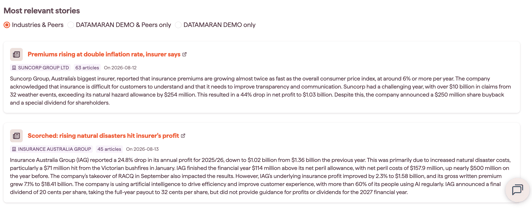
The Reputational Risk driver shows a three-month trendline of public opinion on a risk, based on online news.
To open it, select a risk on the Overview tab, choose the Drivers tab, then select Reputational Risk.
Why this matters
- see how public and media attention on a risk is trending
- compare your company with peers on reputational exposure
- surface the stories, and the potential financial or legal impacts, behind a risk
What the tab shows
The tab gives two views of the trendline, plus the most relevant stories for the risk and the companies in your analysis.
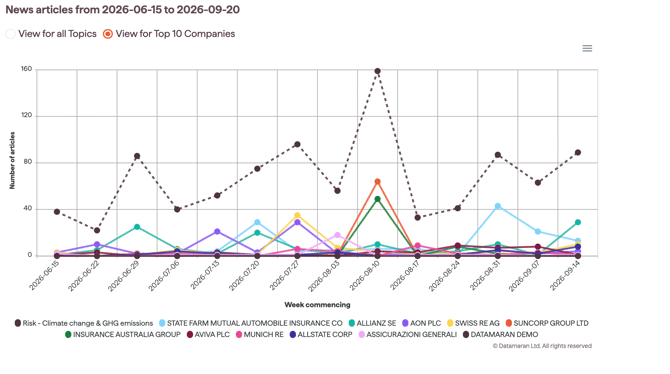
View for top 10 companies
Shows trendlines for the ten most-mentioned companies, so you can compare your organisation with competitors. Toggle companies on and off in the legend.
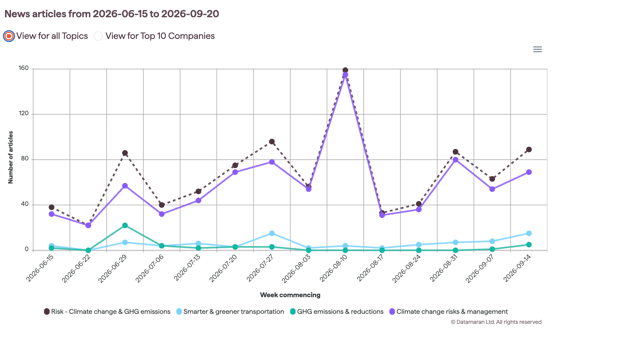
View for all topics
Breaks the risk into its underlying topics, with trendlines across all analysed companies. Toggle topics on and off in the legend.
Filtering the stories
At the bottom of each chart, filter the stories by:
- Industries & Peers
- Your company & Peers only (if available)
- Your company only (if available)
The dotted line shows the total number of analysed articles for a risk. Datamaran analyses online news across eleven languages using EventRegistry, checked against mainstream, industry and geographic coverage.