
When you click into a View from Monitoring, you see a visual breakdown of every regulation matching its scope. Use the View to track regulatory change, drill into specific regulations, and move from overview to action in a few clicks.
Why this matters
- Get a single, visual read-out of every regulation in the View's scope
- Focus on what is new in your chosen time range (last week, last month, last 3 months, and more)
- Spot where activity is concentrated, by topic and by country
- Drill straight from a tile, a chart segment, or a timeline item to the underlying regulations
How to open a View
- In the main menu, select Regulations.
- Click Monitoring.
- Click the View you want to open.
Setting the time range
Use the Time range selector at the top of the View to control the period shown across every tile, chart, and counter on the page.
The time range applies to the whole View. Tiles and charts are updated to reflect the regulations that have changed or been added to the database during the selected period.

Top tiles
The tiles at the top of a View summarise the regulatory landscape inside its scope. Each tile is clickable: selecting one takes you to the underlying regulations list.
- Total: every regulation matching the View's scope.
- Key Regulations: regulations that meet a defined number of essential and impact elements.
- Active: regulations already in force or applicable.
- Proposed: regulations not yet in force, such as bills, proposals, or drafts.
- With sanctions: regulations that mention any of administrative sanctions, civil fines, criminal sanctions, penalties, damages, or injunctions.
- Disclosure Requirements: regulations containing corporate disclosure obligations.

Breakdown charts
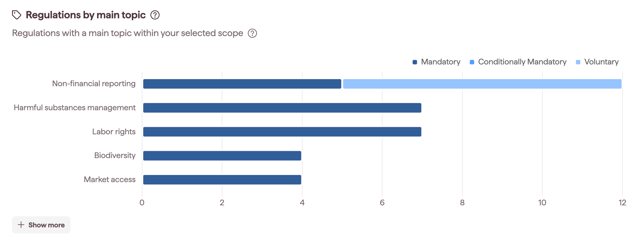
Two interactive charts sit below the tiles. Each chart shows the top entries by default. Select Show more to view the full breakdown.
- Initiatives by topic: regulations grouped by the topics they cover.
- Initiatives by country: regulations grouped by the country they apply to.
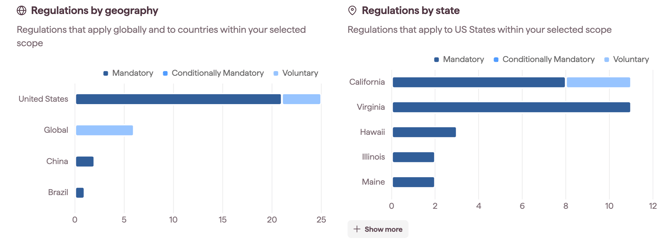
If your View includes United States at the country level, the Initiatives by country chart reflects national-level regulations only. State-level initiatives appear separately in a third chart, Initiatives by state.
Every bar is clickable. Selecting a topic, country, or state takes you to the corresponding regulations list.
Proposed regulations timeline
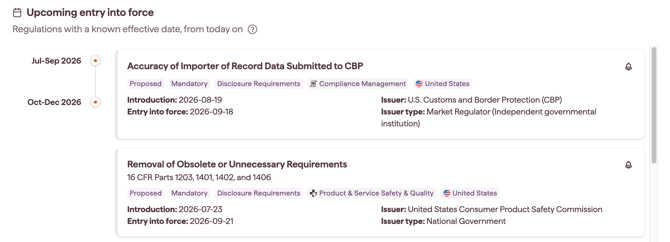
The Proposed regulations section provides a forward-looking timeline of upcoming projected compliance dates, ordered from the nearest date first.
Note: Proposed regulations without an estimated compliance date are excluded from the timeline until a schedule is known. Use the Proposed tile to see every proposed regulation in scope, including those without a confirmed date.
Drilling into a regulation
Any tile, chart segment, or timeline item is clickable. Selecting one takes you to the regulations list, where you can:
- review the regulations matching that filter
- open a single regulation to see its full deep-dive. See Understanding Regulation Cards and Details
- open the AI Insights tab on a regulation to ask questions about its content. See AI Insights for Regulations
- follow a single regulation with the bell icon if you want close tracking of one specific item. See Following an individual regulation or initiative
Note: the regulations list you land on is organised into the document type tabs, so you can separate the source law from national measures and guidance within the segment you selected. See Regulations: Concepts and definitions.
Notes on how this feature is designed
- The tiles, charts, and timeline are all scoped to the View. Changing the time range only changes what is shown inside this View, not the underlying scope.
- To change the scope (countries, industries, topics, text query), you need to update the View itself. See Managing your Views in Monitoring