
AI Insights for Regulations adds a new AI Insights tab at the regulation or initiative level, letting you explore AI-generated insights directly from the regulatory text.
The feature uses the content of the regulation to answer suggested and custom questions, helping you quickly understand key requirements, implications, scope, and areas of relevance, without needing to manually scan long documents. For deeper investigation across the full regulatory text, see Using Full-Text Search for Discovery and Research.
Why this matters
-
Save time on manual research: get quick, plain-language explanations of complex regulatory text
-
Improve consistency: ask the same questions across different regulations to compare requirements and scope
- Tailor answers to your context: set your Country of operation once and every response will factor in where your business is based
- Accelerate analysis: identify key obligations and considerations faster, so you can move to decision-making sooner
How AI Insights works
AI Insights is powered by Large Language Model (LLM) technology and is designed to interpret and explain the regulatory source material.
-
Primary grounding: Responses are based primarily on the regulation text itself.
- Structured context: the Country of operation you select is passed to the model, so it can assess questions like regulatory applicability against the country your business is based in
- Limited context (where available): the feature may use high-level organisational information (e.g., company name, employee count, revenue) to provide light contextualisation
- If context is missing: the AI will rely solely on the regulation text
How to access AI Insights
-
Open any Regulation or Initiative.
-
Navigate to the AI Insights tab.
-
Click an action button for a pre-drafted question, or type your own question.
Set your country of operation
The Country of operation dropdown lets you tell the AI which country your business operates from, so responses can take regulatory applicability and jurisdiction into account when answering.
A country is always selected. You can change it at any time, but you cannot clear it. Once set, your selection persists across regulations and sessions until you change it.
Note: By default, the dropdown is set to the headquarters country Datamaran has on record for your organisation. You can change it at any time.
How to set your country
- Open the AI Insights tab on any Regulation or Initiative.
- Click the Country of operation dropdown above the question field.
- Use the search box to find your country, or scroll the list.
- Select your country.
Tip: When you open another regulation, the same country stays selected until you change it.
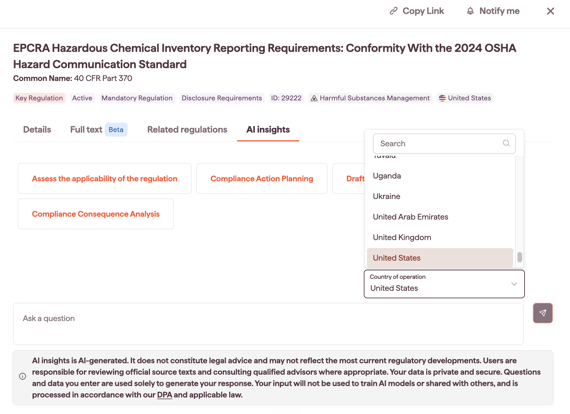
Changing your selection
To change the country, open the Country of operation dropdown again and choose a different option.
Note: Answers already generated earlier in the current session stay as they were. They are not re-run with the new country. Only responses generated after the change will use the updated selection.
How to use AI Insights
Use a pre-drafted question
The AI Insights tab includes action buttons that run common pre-drafted questions in one click. The current set covers:
- Assess the applicability of the regulation
- Compliance action planning
- Draft summary email
- Compliance consequence analysis
Ask a custom question
- In the AI Insights tab, type your question in the question field.
- Submit your question to generate an answer.
- Refine your question if needed (see tips below).
Improve results with added context
Beyond your Country of operation selection, you can enrich answers by including extra context directly in your question, such as:
- additional jurisdictions where you operate (e.g., "We also operate in Germany and Brazil...")
- your sector or business model (e.g., "We're a SaaS provider...")
- the type of activity affected (e.g., "We process employee data...")
The AI will consider that information alongside your Country of operation when generating its response.
Tips and best practices
- Set your country first: confirm your Country of operation before asking, so the model has the right baseline for applicability questions
-
Be specific: Ask about a particular obligation, scope element, or definition (e.g., “What are the reporting requirements and deadlines?”)
-
Use follow-ups: If the first answer is broad, ask “Which section covers this?” or “What are the exceptions?”
-
Add context carefully: Include operational details that change the interpretation (e.g., jurisdictions), but keep questions focused.