
Regulation cards help you quickly understand what a regulation is, where it applies, and what it’s mainly about, so you can triage faster and decide what to track. Opening a regulation gives you a complete, structured view (summary, lifecycle, scope, sanctions, and more) so you can assess impact and share the right context with stakeholders.
Regulation cards: what you see at a glance

Title
The Title is the main name of the regulation/initiative shown in Datamaran.
Original title (when applicable)
If the regulation was published in a language other than English, an Original title appears below the Title. This is the regulation name in its original language.
Tags
Cards use tags to make scanning and filtering easy. Common tags include:
-
Country/region tag (where the regulation applies)
-
Main topic tag (the primary subject area)
- Document type tag (the kind of legal instrument, for example Primary Legislation or Guidance & Standards). See Regulations: Concepts and definitions
You may also see other tags depending on the regulation (for example, Status, Key Regulation, Enforcement level, or Disclosure requirements).
Key dates
Cards highlight key lifecycle dates, such as:
-
Introduction
-
Entry into force (for mandatory regulation) / Publication (for voluntary initiatives) / Launch (for consultations)
Notifications
A bell icon  on the card lets you enable notifications for that regulation so you can stay informed about updates.
When you open a regulation: the regulation full detail view
Clicking a regulation card opens a pop-up that contains the full regulation detail view, organised into four tabs:
-
Details
-
Full text
-
Related regulations
-
AI Insights
Tip: The bell icon is available in the pop-up as well (near the regulation header) so you can enable notifications while reviewing the details.
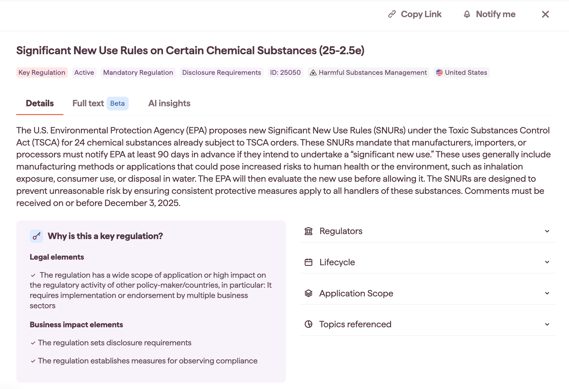
Details tab
Use Details to understand the regulation at a glance and review structured information.
What you’ll see:
-
Full summary of the regulation/initiative
-
Key Regulation explanation (when applicable): if the item is marked as a Key Regulation, Datamaran includes an explanation of why
-
Expand/collapse sections (as available), including:
-
Regulators
-
Lifecycle
-
Application scope
-
Sanctions
-
Topics referenced
-
The Details tab is designed for fast assessment: you can confirm who is driving the regulation, where it is in its lifecycle, who/what it applies to, and what enforcement consequences may exist, without leaving the pop-up.
Full text tab
Use Full text to review the regulation wording and source materials.
What you’ll see:
-
The full regulation text
-
If the original is not English, Datamaran displays a translated English version
-
A link to the official source text
-
Additional supporting links (when applicable)
This tab helps you validate specifics directly from the source and quickly access official documentation for legal or compliance review.
Related regulations tab
Use Related regulations to see how the regulation connects to other items (for example, where one regulation amends, implements, transposes, relates to, or repeals another).
For definitions of relationship types, refer to this article: Regulations: Concepts and definitions
The Related regulations help you understand dependencies and downstream changes — so you don’t evaluate a regulation in isolation.
AI Insights tab
Use AI Insights to explore AI-generated answers based on the regulation text.
You can:
-
Choose a suggested question or enter your own
-
Ask follow-up questions
-
Add light context (e.g., sector, jurisdictions) to improve relevance
For full guidance, see: AI Insights for Regulations
AI Insights can reduce the time spent reading long documents by surfacing clear answers grounded primarily in the regulation text, helping teams work more consistently and efficiently.