
When you reassess your analysis with Double Materiality Evaluate, Datamaran flags short-term IROs carried over from the previous version, so you can prioritize them for review. Short-term IROs are the time-sensitive ones most likely to need updating each cycle.
How it works in your Double Materiality assessment
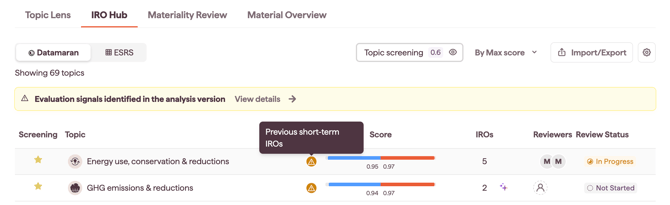
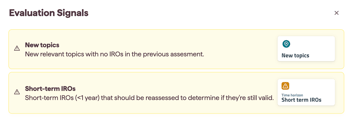
In the IRO Hub, a topic with a carried-over short-term IRO shows a short-term icon. On carry-over, bottom-up short-term IROs are set to To assess, and all other carried-over IROs are set to Not required. Click View Details to see what the icons mean.

What you should do
- Filter the IRO inventory by the short-term column to isolate the IROs to prioritize for reassessment.
- Review each flagged short-term IRO to check whether it still applies.
- Confirm the accuracy of the previous assessment.
- If needed, the analysis owner can:
- reassess the IRO directly, or
- assign the topic to an SME for reassessment.
- Once the reassessment is complete and validated, the Owner updates the Assessment status to Assessment complete in the IRO long list.
Note: the short-term signal and the To assess status apply to bottom-up IROs. A topic concluded top-down is re-confirmed at topic level and does not go through per-IRO reassessment. See Choosing a topic's materiality path: top-down or bottom-up.