
The Evidence panel in Topic Lens brings together two sources of evidence for a topic in your Double Materiality Assessment (DMA): screening survey results and peer IRO disclosures. The results appear on the topic itself, so you don't need to download the survey results file.
Run topic screening first to decide which topics move forward. Then, optionally, run a screening survey to collect stakeholder votes. Use the results on each topic's Evidence panel tab to choose its materiality path (top-down or bottom-up), or to confirm a topic you excluded.
Why this matters
- Base the materiality path on stakeholder input and peer practice, not judgment alone
- Review the evidence in the same side panel where you choose the path
- Check results by stakeholder group, country or value stream
- Record a clear rationale for your choice while individual answers stay private
Where to find the Evidence tab
- Open your Double Materiality Assessment.
- Go to Topic Lens.
- In the tornado chart, click any score bar for the topic you want to review.
- In the side panel that opens, click the Evidence panel tab.

The Materiality path option sits at the top of the side panel, alongside the topic's financial and impact deep dives. For more on the chart, see Interpreting the Tornado Chart.
Stakeholder survey
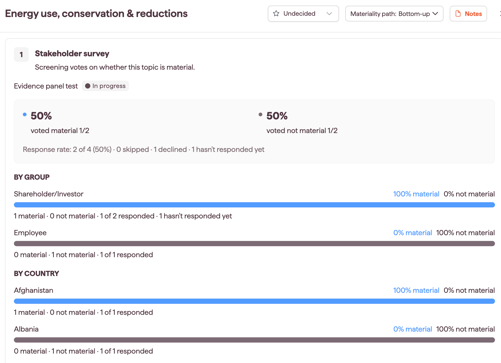
The Stakeholder survey card shows how stakeholders voted on whether the topic is material. The survey name and status appear at the top, for example In progress.
If you run more than one screening survey for the same analysis, use the dropdown at the top of the card to choose which survey's results to show.
The card then shows the aggregated results for the topic:
- Voted material and voted not material: the percentage of respondents who voted each way, with the number of votes (for example, 2/2)
- Response rate: how many invited stakeholders responded, out of the total invited, and how many skipped the topic, declined the survey, or hasn't responded yet while the survey is still open
Breakdowns and comments
- If the survey collects stakeholder groups or countries, the card shows results By group and By country, with the percentage and number of material and not material votes.
- If the survey includes an explainer question, the card also shows the comments stakeholders left on the topic.
Note: Results always show in aggregate. The card never shows an individual stakeholder's answers.
Only screening surveys appear on the Evidence panel tab. Issue prioritization surveys don't, as their results go into a Stakeholder Analysis.
If there are no survey results
- If no survey is linked to the analysis, the card shows No survey linked yet with the message "This topic doesn't have any survey data yet. Create a survey to start collecting evidence for this analysis." Click Surveys to open the Survey module. See Creating a screening survey.
- If the topic wasn't included in the survey, or got no responses, the card says so. Which topics go into a survey depends on the Topics included setting chosen when the survey was created.
Peer disclosures
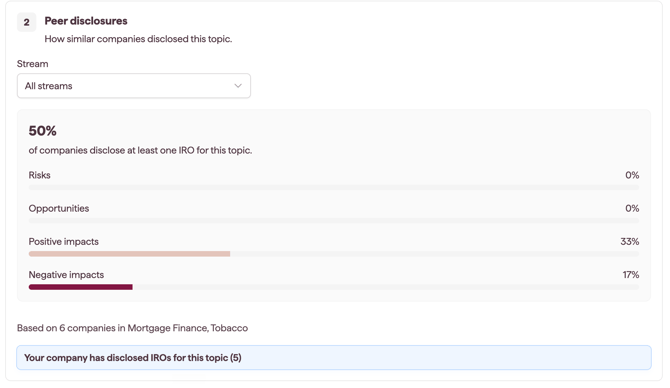
The Peer disclosures card shows the percentage of companies that disclose at least one IRO for the selected topic.
The data comes from the IRO Industry Landscape, matched to Datamaran topics. See Benchmarking with IRO Industry Landscape.
The card also shows:
- the percentage broken down by risks, opportunities, positive impacts and negative impacts
- how many IROs your company has for the topic
Filtering peer disclosures by stream
The card shows All streams by default. Use the stream selector on the card to choose Core operations, Upstream or Downstream. The percentages update to that stream.
Choosing the materiality path
After reviewing the evidence, select Top-down or Bottom-up in the Materiality path option at the top of the side panel. See Choosing a topic's materiality path: top-down or bottom-up.
Notes on how this feature is designed
- The Evidence panel informs the decision. It doesn't set the path, change materiality decisions, or change IRO scores.
- Screening surveys are optional. You can choose either path with or without survey results.
- Survey results show for Excluded topics too, so you can check an exclusion against stakeholder views.
- The top-down path can only conclude a topic material. If most stakeholders vote not material, choose bottom-up and assess the topic's IROs, or go back to topic screening if the topic should be excluded.
- The survey links to the analysis, and its results show on the analysis's latest version.