
ESRS mapping links each IRO (impact, risk and opportunity) in the IRO Hub to the European Sustainability Reporting Standards (ESRS) topics and sub-topics. Datamaran maps suggested IROs automatically, connecting Datamaran's broader list of topics to the ESRS.
Which ESRS list you map to depends on the analysis version. Versions created before 30 September 2026 use ESRS 2023 (the AR16 list, with topics, sub-topics and sub-sub-topics). Versions created from 30 September 2026 use ESRS 2026, which has two levels: topics and sub-topics. For more on the change, see ESRS 2026 in Double Materiality: what changes and your options.
Note: mapping to ESRS is a recommendation. Check that it fits your requirements and edit the mapping as needed.
Why this matters
- You can review your IROs organised by the ESRS structure you report against
- You keep control of the final mapping, including for IROs that are specific to your organisation
- Changes you make are reflected in both the Datamaran and ESRS views
Where to find the ESRS view
To generate IROs first, see Generating, Editing and Deleting AI's Suggested IROs.
Once at least one IRO is mapped to an ESRS topic, the ESRS tab becomes available in the IRO Hub.
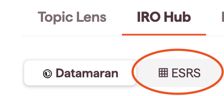
IROs are organised according to the ESRS classification of your analysis version.
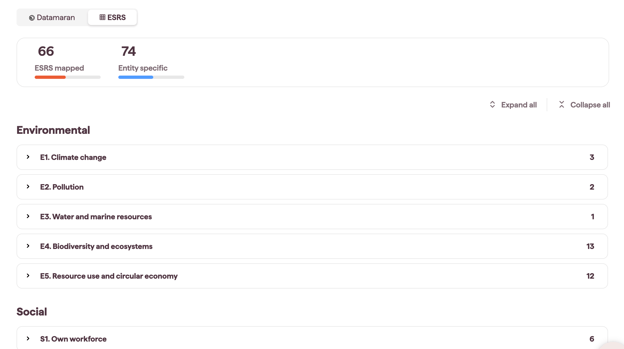
IROs that can't be mapped to an ESRS topic stay mapped to Datamaran topics and are shown at the bottom of the page as Entity-Specific IROs.

How to map or change the mapping on an individual IRO
- Open the IRO. Click any IRO to open its side panel. The ESRS topic dropdown is below Datamaran topics.
- Map to ESRS. Click +Add topic and select the ESRS topic. You can also add a sub-topic. In ESRS 2023 versions, you can also add a sub-sub-topic.
- Remove an ESRS topic. If needed (for example, the IRO is entity-specific), click X next to the topic or sub-topic to remove it.
- Save changes. Click Save to return to the previous screen.
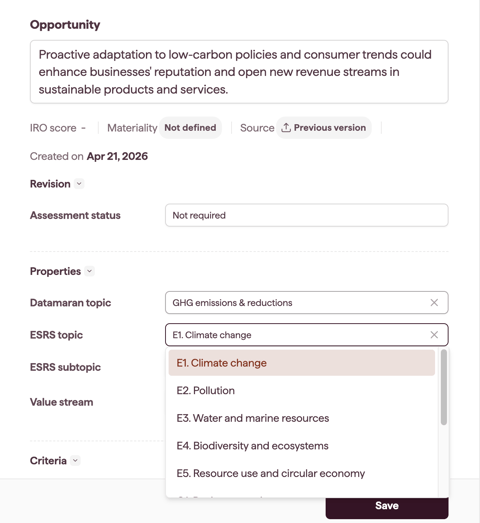
Note: you can edit the mapping at any time, except when an SME (subject matter expert) is assessing the IRO or a new version of the analysis is available.
Whichever view you work in (Datamaran or ESRS), changes you make to an IRO are reflected in both.
Checking IROs after moving to ESRS 2026
When you carry IROs into a new analysis version created from 30 September 2026, their ESRS tags are updated to ESRS 2026 automatically. Most IROs move one-to-one. For the few sub-topics that were split or removed, the platform assigns the closest ESRS 2026 sub-topic.
- In the new version, open the ESRS tab in the IRO Hub.
- Check the IROs under Own workforce, Workers in the value chain, Water and marine resources, Pollution, and Biodiversity and ecosystems.
- If a tag doesn't fit, change it using the steps above.
Tip: your earlier version keeps its ESRS 2023 mapping, so you can open it to compare.