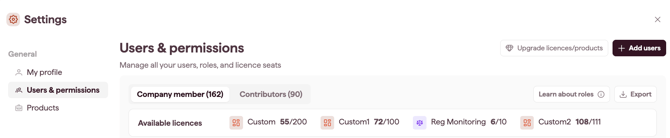
Seats show how many users your licences allow and how many are in use. Account Owners and Admins can check seats and licences at any time.
How to check seats
- Open Settings and select Users & Permissions (see Open and navigate Settings).
- View the Available licences bar, which shows used against total.
For a per-product breakdown, open Products and expand a product card. See View your products and licences.
How seats are counted
- Seats are counted per licence type independently (for example, Suite separately from Reg Monitoring).
- Contributor users do not use a seat.
Note: to add seats to your plan, or to reduce your seat limit, contact your Datamaran team. A reduction is blocked while users are still assigned to those seats.
Export assigned seats
Use the Export button to export the user list to an Excel spreadsheet. The file will include the user name, email, user role, assigned License / Product and last login date.