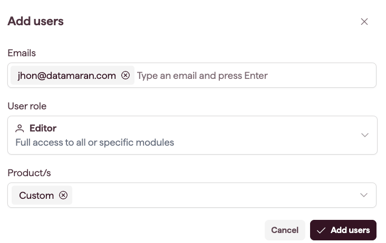
Add a user to invite someone to your account and assign their role, licence, and module access. Account Owners and Admins can add users.
How to add a user
- Open Settings and select Users & Permissions (see Open and navigate Settings).

- Select Add users.
- Type one or more email addresses, pressing Enter after each one.
- Select a User role: Admin, Editor, or Contributor.
- Select the Product/s. This is the licence, and the field appears once you pick a role.
- Confirm.
What happens after adding
- If a seat is available, the user is created and receives a welcome email.
- If no seat is available, a no-seats message appears. See Check seats and licences.
- Contributor users do not use a seat.
Note: to add more seats to your plan, contact your Datamaran team.