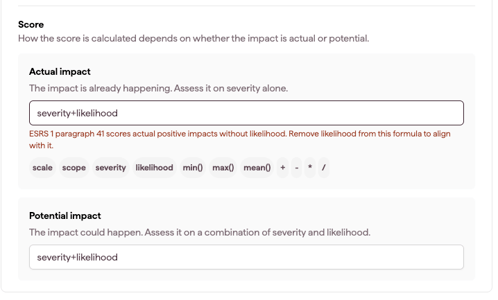
IRO score formulas decide how each IRO's score is calculated from its assessment criteria. Datamaran gives you default formulas aligned with the revised ESRS. If your double materiality assessment uses its own logic, analysis owners can change the formulas, the criteria scale and the materiality thresholds, so the scores on the platform match the methodology you document for your auditor.
Formulas apply only to the IROs that are scored: the IROs on bottom-up topics, and any IROs routed to bottom-up. Topics concluded on the top-down path are decided at topic level, so they are not scored. See Choosing a topic's materiality path: top-down or bottom-up.
How to open the IRO score formulas
- Open the IRO Hub from the Double Materiality module's left-hand menu.
- Click the settings icon.
- Select the IRO Score formulas tab.
The same window also has the IRO Criteria scale and Custom fields tabs.

Formulas by IRO type
Impacts have separate formulas for actual and potential impacts. Under the revised ESRS, likelihood applies only to potential impacts (ESRS 1 Paras 40–41).
Section |
Formula |
What the ESRS require |
|---|---|---|
| Risks | Risks score formula | Likelihood and magnitude of financial effects (ESRS 1 Para 50) |
| Opportunities | Opportunities score formula | Likelihood and magnitude of financial effects (ESRS 1 Para 50) |
| Positive impacts | Potential positive impact score formula | Scale, scope and likelihood (ESRS 1 Para 41) |
| Actual positive impact score formula | Scale and scope, no likelihood (ESRS 1 Para 41) | |
| Severity score formula | Scale and scope | |
| Negative impacts | Potential negative impact score formula | Severity and likelihood (ESRS 1 Para 40) |
| Actual negative impact score formula | Severity, no likelihood (ESRS 1 Para 40) | |
| Severity score formula | Scale, scope and irremediability. Any one of the three can make an impact severe (ESRS 1 AR 22) | |
| Negative impact human rights related score |
Severity takes precedence over likelihood (ESRS 1 Para 40). Used for potential negative impacts marked as human-rights-related. See Assessing IROs related to Human Rights |
Default formulas
Each criterion is scored on a 1 to 5 scale by default. A new analysis starts with these formulas:
- Risks and opportunities: magnitude*likelihood/5
- Potential positive and negative impacts: severity*likelihood/5
- Actual positive and negative impacts: severity
- Positive impact severity: (mean(scale, scope)+max(scale, scope))/2
- Negative impact severity: (mean(scale, scope, irremediability)+max(scale, scope, irremediability))/2
- Human-rights-related potential negative impacts: severity
How to change a formula
- Write the formula using the criteria names (magnitude, likelihood, scale, scope, irremediability, severity) and the supported operators: +, -, *, /, mean(), min(), max().
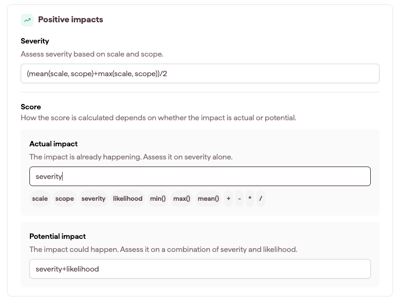
- Click Save and apply.
- Confirm with Save and recalculate.
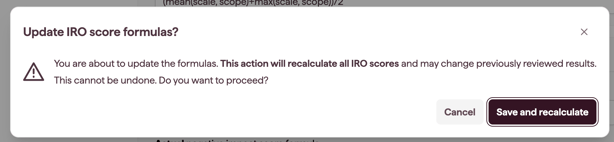
Note: saving recalculates all IRO scores in the selected version. This can change results you have already reviewed, and it cannot be undone. We recommend recording the change and the reason for it in your methodology documentation before you save.
If you change the criteria scale, check that your formulas still give scores on that scale, then review your materiality thresholds.
Versions and existing analyses
- Formulas are saved per version and carry over when you create a new version.
- Existing analyses also have separate fields for actual and potential impacts. Each field shows the formula you were using before, so actual and potential impacts most likely still use the same formula. Your scores do not change until you edit and save.
- If an actual impact formula still includes likelihood, a warning shows under the field. Remove likelihood from the formula and save to align with ESRS 1 Paras 40–41.
- Scores appear only once all required criteria are completed.