
The IRO Heatmap gives you a visual overview of your double materiality assessment and its material topics, including the number of IROs (Impacts, Risks and Opportunities) linked to each topic and value stream. It helps you see which topics have the highest concentration of IROs.
The heatmap is available for both Datamaran Topics and ESRS Topics, and you can export it as a visual table for presentations or reports.
The heatmap shows your material topics, whether a topic is material through bottom-up assessment (its IROs scored against a threshold) or through a top-down conclusion. A topic concluded top-down appears based on its underlying impacts and risks, on the financial axis, the impact axis, or both. See Choosing a topic's materiality path: top-down or bottom-up.
How to generate the IRO Heatmap
- For bottom-up topics, go to the Materiality Review tab and define at least one materiality threshold for your assessed IROs.
- Go to the Materiality Overview tab.
- Click the table icon to switch from the visual matrix to the IRO Heatmap view.
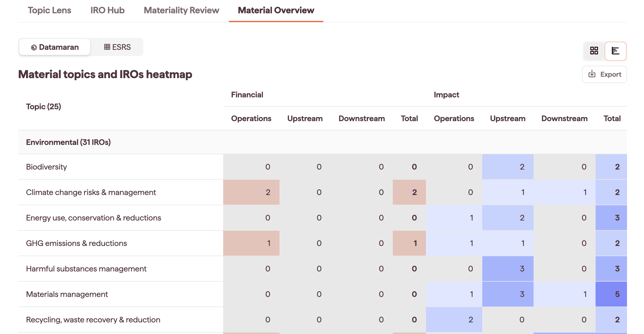
- The IRO Heatmap shows each material topic with the number of IROs in each value stream.
- Use the Datamaran / ESRS selector to toggle between the two topic frameworks.
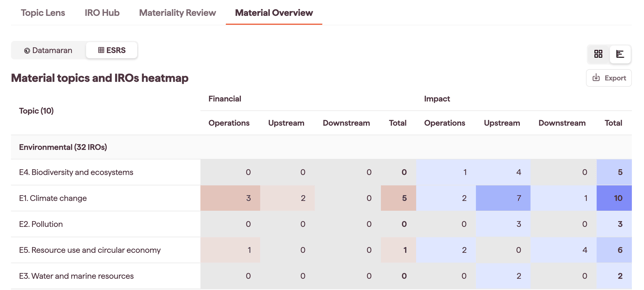
- Use the Export option to download the heatmap as a visual file for presentations or reports.
Notes
- Both bottom-up and top-down material topics appear in the heatmap. A top-down topic appears on the financial axis, the impact axis, or both, depending on its underlying impacts and risks.
- The heatmap is available once you have material topics: either at least one threshold defined for bottom-up topics, or topics concluded top-down with underlying IROs deemed material.
- You can switch between Datamaran Topics and ESRS Topics views at any time.