
The Summary tab gives you a business-level read on a single risk, through two groups of metrics: Risk Dimensions and Disclosure Diagnostics.
To open it, select a risk on the Overview tab, then choose the Summary tab in the risk's description.
Why this matters
- update your risk register with an external assessment of the dimensions used to prioritise risks: Likelihood, Impact and Velocity
- give your board quarterly, automatically generated metrics based on current data
- benchmark your disclosure against your selected peers
- find disclosure and risk-management gaps before your Annual Report
What the Summary tab shows
The tab groups its metrics into two sets.
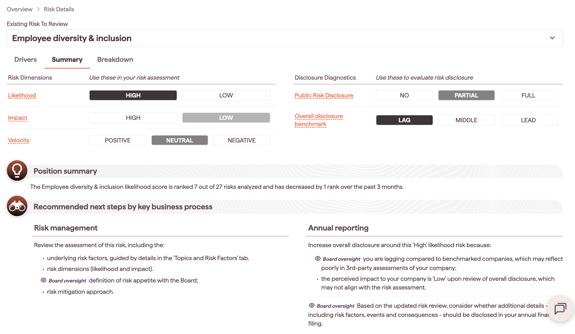
Risk Dimensions
- Likelihood: how likely the risk is, relative to your other risks
- Impact: the anticipated impact on your company
- Velocity: the direction of change in likelihood over the past three months
Disclosure Diagnostics
- Public Risk Disclosure: whether the risk appears in the risk factors section of your recent 10-K or Annual Report
- Overall Disclosure Benchmark: how your disclosure compares with your selected peers
For how each of these metrics is scored, see [link: How the Summary tab metrics are scored].
Recommended next steps by key business process
The tab also gives Recommended next steps by key business process: high-level suggestions to guide action, drawn from a combination of the metrics that apply to each risk.