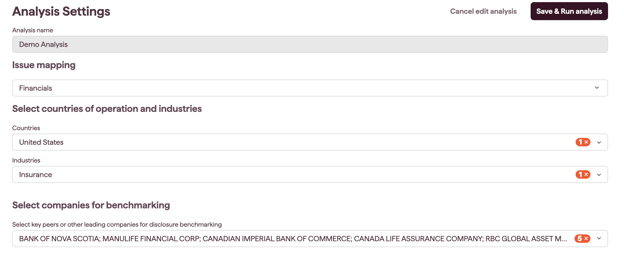
An External Risk Analysis tells the Executive Dashboard which risks to analyse, based on the industries, countries and peers you choose.
To start, open the Executive Dashboard and click the three-dot menu beside the analysis name, then click Create New.
Why this matters
- tailor the analysis to your industries, footprint and peer set
- benchmark your disclosure against the companies you care about
- run it once and save it to reuse and monitor over time
How to set up an analysis
- On the Executive Dashboard, click the three-dot menu beside the analysis name, then click Create New
- Name the analysis
- Choose the issue mapping: select how you want to analyse risks. Datamaran offers industry-specific templates aligned with major reporting standards, which you can customise to match your materiality analysis
- Set the parameters using the dropdowns:
- Industry(ies): based on SASB's Sustainable Industry Classification System (SICS), defaulting to your sector
- Country(ies) of operation: defaults to your headquarters location; add the countries you operate in, or select regions
- Companies for benchmarking: select the key peers or companies you want to benchmark your disclosure against (we recommend around ten)
- Click Save & Run analysis
Datamaran scans its external source database against your parameters, then takes you to the Risk Overview page. Your analysis saves to the Executive Dashboard for future access.