
The Regulations Monitoring dashboard gives you a single, visual overview of your ESG regulatory landscape. It brings together key metrics, interactive charts, and a forward-looking view of upcoming compliance dates, with one-click drilldowns to the underlying regulations.
Why this matters
- See your regulatory landscape at a glance across metrics, topics, geographies, and compliance dates
- Focus on what's relevant to your business with filters, text search, and saved views
- Move from a metric or chart straight into the underlying regulations list to act on what you find
Access the Regulations Monitoring Dashboard
-
In the main menu, select Regulations to open the dropdown.
-
Click Monitoring.
Set your time range
Use the Time range selector to control the period shown across the dashboard.

Refine results with filters and text search
By default, the dashboard loads with:
-
One country (based on your HQ), and
-
One industry
Use the filters and text search to quickly narrow what you’re seeing and update the dashboard results. Click Reset to clear all filters and search criteria at any time.

Tip: Filters, text search, and time range work together. Changing any of them refreshes the tiles, charts, and timeline.
Save your view
A view captures the dashboard exactly as you've configured it, including the time range, filters, and text search. Save a view to return to the same combination later, and to receive notifications when regulations matching it change.
- Set your time range, filters, and text search so the dashboard reflects what you want to monitor.
- Click Save view in the top right corner of the dashboard.
- In the dialog that opens, enter a name for the view and choose whether to enable notifications.
- Click Save to finish.
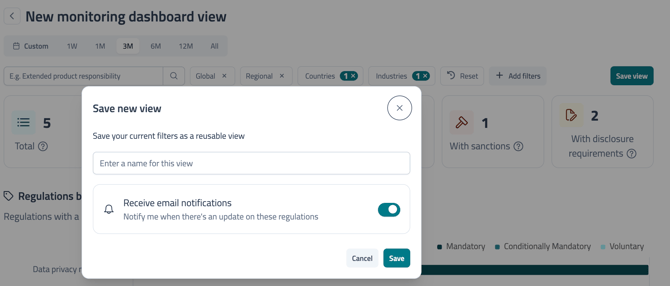
Note: Clicking Save view while a saved view is already active creates a new view rather than updating the active one.
What happens after saving
The saved view name appears in the breadcrumb at the top of the dashboard (for example, Monitoring/test new view), so you can see at a glance which saved view is active.
Reopen a saved view
Use Load Search in the filters panel to reopen a view you've saved.
- Click Add filters to open the filters panel.
- Select Load Search at the bottom of the panel.
- In the side modal that opens, choose the view you want to reload. The dashboard restores the saved time range, filters, and text search.
Review key metrics
The top tiles summarise your regulatory landscape:
- Total
-
Key regulations
-
Active regulations
-
Proposed regulations
-
Regulations with sanctions
-
Regulations with disclosure requirements

Explore initiatives by topic and country
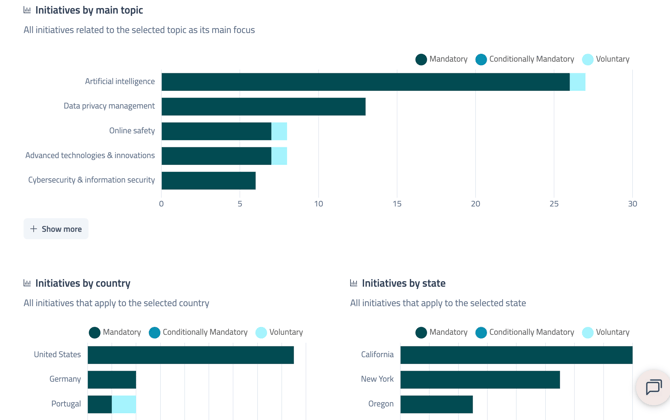
Use the charts to understand distribution at a glance:
-
Initiatives by main topic
-
Initiatives by country
- Initiatives by state (only shown when US states is selected in the filters)
Select Show more on either chart to view the full breakdown.
Understanding US coverage
-
If you select United States as a country, the Initiatives by country chart reflects national-level regulations only.
-
If you select US states in the filters, state-level initiatives are shown separately in Initiatives by state.
Drill down to the regulations list
Any tile, chart segment, or timeline item on the dashboard is clickable. Selecting one takes you to the corresponding regulations list, where you can:
-
Review regulation details
-
Save results / start monitoring
-
Monitor specific regulations
🔗 For instructions on how to save and monitor the results, see: Setting Up Search-Based Monitoring Notifications
🔗 For instructions on setting up notifications for a single regulation or initiative, see: Following an Individual Regulation or Initiative
Proposed regulations timeline
The Proposed regulations section provides a forward-looking timeline of upcoming projected compliance dates, ordered from the nearest date first.
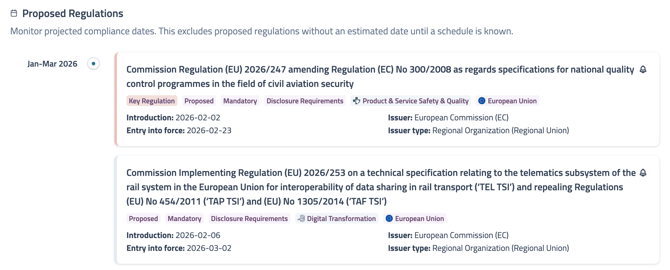
Note: Proposed regulations without an estimated compliance date are excluded until a schedule is known.
FAQs
Why don’t I see some proposed regulations in the timeline?
Only proposed regulations with an estimated compliance date appear. If no schedule is available yet, it won’t be shown until an estimated date is known.
Why do the numbers change when I adjust the dashboard?
The dashboard updates based on your selected time range, filters, and text search. Changing any of these will refresh the tiles, charts, and timeline to reflect your current view
Why don’t I see certain countries or industries in the results?
By default, the dashboard loads with one country (based on your HQ) and one industry selected. Update the filters to broaden (or narrow) your view.
How do I reopen a saved view?
Open the filters panel and click Load Search, then choose the view you want to reload. This restores the time range, filters, and text search you saved.
Can I share a saved view with a colleague?
Saved views are currently personal to your user account.