
Manual materiality override lets you manually change an IRO’s materiality decision to Material or Not material during review.
When you apply an override, you must add a Rationale (mandatory). This creates a clear audit trail explaining why the final decision differs from the threshold-based result.
Why this matters
Double materiality outcomes sometimes need human calibration during validation. For example, when senior stakeholders review results and confirm that certain IROs should be treated differently based on business context.
Manual materiality override helps you:
-
handle edge cases without changing thresholds or reworking IRO criteria
-
keep decision-making traceable with a mandatory Rationale
-
move faster through validation while maintaining governance and accountability
This feature is available in:
-
Double Materiality → Materiality Review tab
Note: Override status is currently only visible in the Materiality Review tab.
Which IROs can you override
You can override scored IROs: IROs in topics on the bottom-up materiality path and IROs routed for assessment from a top-down topic. IROs without scores don't appear in the Materiality Review tab.
Note: IROs in topics concluded top-down that aren't routed for assessment display Material (top-down) in the Material column, and the override option is blocked for them. Their materiality comes from the topic-level conclusion (see Choosing a topic's materiality path: top-down or bottom-up).
How to apply a manual materiality override
Step-by-step
-
Open Double Materiality.
-
Go to the Materiality Review tab.
-
Confirm materiality thresholds have been applied.
-
efore thresholds are applied, IROs display Undecided in the Material column, unless they were material in the previous cycle and keep that decision under the carry-over rules (see Recommended evaluation flow for reassessing IROs). Once thresholds are applied, each scored IRO displays a Material or Not material tag. IROs in topics concluded top-down display Material (top-down).
-
-
On the IRO row you want to update, select the ⋮ (three dots) menu next to the materiality tag.

-
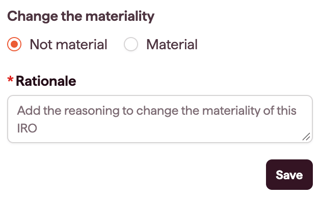
In the pop-up titled Change the materiality:
-
Select Not material or Material
-
In Rationale, enter the reason for the manual change (mandatory)
-
-
Select Save.
What happens after saving
-
The IRO will show an indicator that the materiality decision has been changed manually (override applied).
-
The updated materiality tag remains visible in the Material column for that IRO.
Resetting an override
You can reset (delete) a previously applied override to restore the original threshold-based materiality decision.
To reset an override:
- Select the ⋮ (three dots) menu next to the IRO's materiality tag.
- Select Reset materiality.
- Confirm the action.
The IRO will revert to its original materiality decision based on the applied thresholds, and the override indicator will be removed.
Override in the IRO export
The manual materiality override and its Rationale are included in the IRO export. This ensures your audit trail is fully captured when sharing or reporting results outside of Datamaran.
To export, use the export option in the Materiality Review tab. The exported file will include a column for the override status and the corresponding rationale for any IROs where an override has been applied.