
To keep pace with a constantly evolving ESG landscape, Datamaran has developed a feature that allows you to keep your finger on how the issues that matter to your business are evolving, all reflected in your Stakeholder Matrix.
To see the evolution of your material issues, click "Start Monitoring". The system will allow you to generate a new stakeholder analysis version by selecting it. Here you can either select the version of the analysis you want to see or compare two versions and see how issues have changed over time.

Once you have started the monitoring process, you can either select the version of the analysis you want to see or compare two versions to see how issues have changed over time. Here you can also generate a new version when you need it by clicking in the new version box.

Once you have selected the two analyses, you will see three tabs:
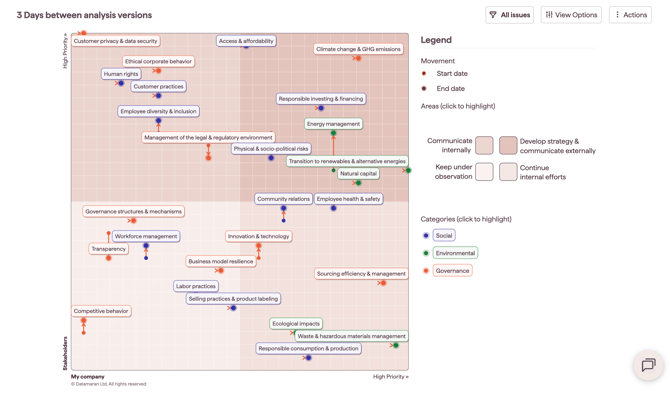
- A matrix visualization of the changes between the two versions
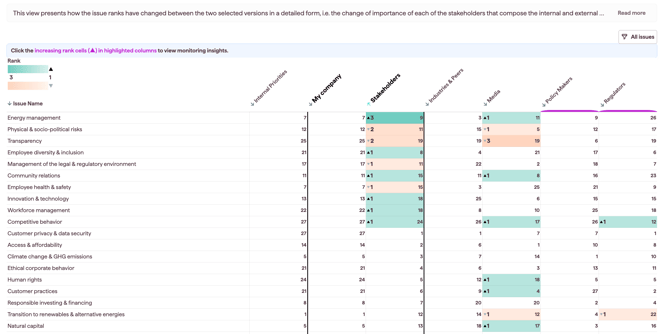
- The Stakeholder view presents how the issues have changed between the two versions. The rank change is in bold numbers, and the current rank is the number next to it. A green shading will appear when an issue has gained more importance; in case of an important decrease, a red shading will be applied to the cells.
We recommend you start monitoring after you finalize your analysis and once you are happy with its settings. Once the monitoring process has started, you can still modify the settings of the stakeholders and create new versions of the analysis.