
[Reports]
Datamaran’s Reports search is designed for in-depth research, helping you find specific ESG disclosures and data points inside corporate reports. It’s especially useful when running benchmarking exercises that require evidence (e.g., metrics, assurance language, governance statements, or policy commitments).
Note: If you’re looking to benchmark at the topic level, use the dedicated Benchmark module. Reports search is for detailed, report-level investigation and sourcing.
Why this matters
Use Reports search to:
-
Locate specific disclosure language quickly across thousands of reports, without manual PDF trawling.
-
Compare how peers disclose (and where they disclose) key ESG information, backed by report evidence.
-
Track how disclosure on a theme evolves over time and across regions, sectors, and report types.
Before you start
To get the best results, it helps to have:
-
A keyword, phrase, or data point you want to find (for example: “reasonable assurance”, “transition plan”, “Scope 3 category 1”, or “double materiality”).
-
Optional: a target peer set, region, sector, or report type you want to focus on.
If you need help building advanced queries (AND/OR/quotes), see: Building search queries in Datamaran’s Report search tool
Run a search in Reports
-
In the left-hand menu, go to Search.
-
Open the Company Reports tab.
-
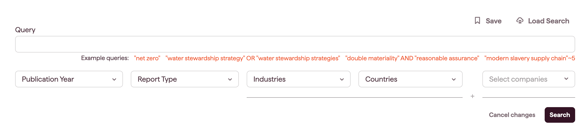
Enter your search query in the search bar.
-
Example:
"double materiality" AND "reasonable assurance"
-
-
Refine your results using the filters beneath the search bar (recommended):
-
Years (focus on a time period)
-
Report types (compare disclosures across report categories in the database)
-
Companies (search a specific company’s reports)
-
Industries / Countries / Regions (focus your peer set)
-
-
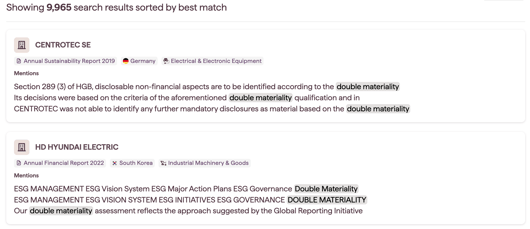
Click Search. Results will appear in the Mentions tab.
Review results in Mentions
In Mentions, you can:
-
See the most relevant report matches for your query (sorted by relevance).
-
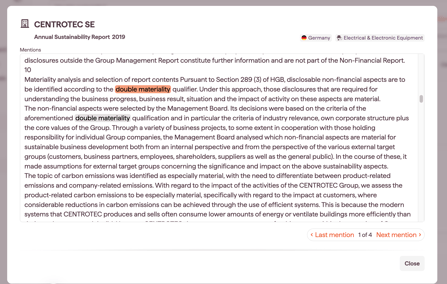
Click a report title to open the report view and review highlighted references in context.
Note: Relevance considers multiple factors, including how often your terms appear in the report text.
Analyze patterns in Insights
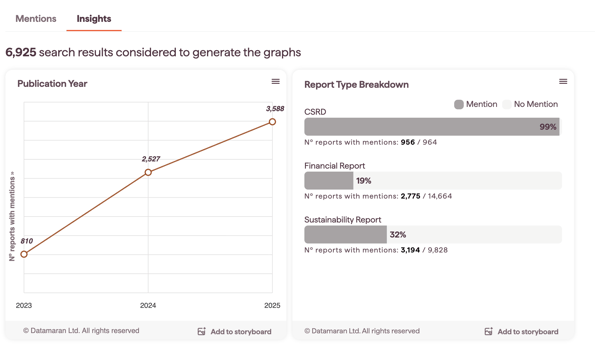
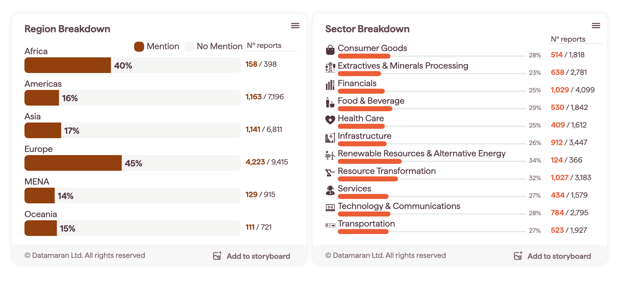
In the Insights tab, you can visualize results across four views:
-
Publication year – how references change over time
-
Report type breakdown – where the topic is most commonly discussed
-
Region breakdown – where mentions appear geographically
-
Sector breakdown – which sectors discuss it most
Tips for better searches
-
Always add terms within quotes (e.g.,
"reasonable assurance"). -
Start broad, then narrow with filters (years, report types, companies).
-
If results are too narrow, remove one condition (e.g., change
ANDtoOR) or expand the year range. -
Consider adding synonyms or related terms (e.g.,
"limited assurance"OR"reasonable assurance").
Troubleshooting
-
No (or very few) results: Broaden your query, expand the year range, or remove a filter (especially company-level filters).
-
Too many results: Add another keyword/phrase, or limit by report type and year.
-
Results feel unexpected: Results are sorted by relevance. Open a few reports in Mentions to validate how your terms appear in context.