
The Duplicate functionality in the Executive Dashboard allows you to duplicate an analysis, modify the existing parameters and then compare the results with the original analysis, revealing a different perspective on your data, scope and insights.
To duplicate an analysis, go to the Overview page, and navigate to the dropdown menu button.
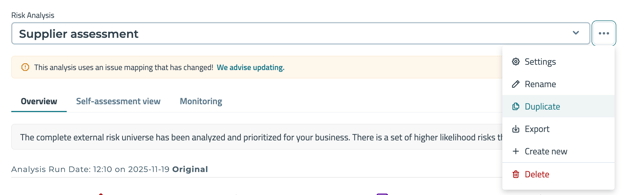
- Click Duplicate
- Edit the name of your duplicated analysis and click "Run Analysis".
The Duplicated Analysis will be saved on the Executive Dashboard. It can also be selected from the drop-down menu of the Risk Analysis.