
After benchmarking in the IRO Industry Landscape, you can use industry summaries and generate Proposed IROs to help close gaps in your IRO long list. This helps you move from "what's missing?" to "what should we consider adding?" without requiring manual peer-report comparisons.
Why this matters
- Validate IRO completeness more efficiently
- Reduce time spent reviewing peer disclosures
- Build a stronger, more defensible IRO long list with clear value stream and ESRS context
Where to find summaries and Proposed IROs
- Open your Double Materiality analysis.
- Click See IRO Industry Landscape.
- Use the Stream dropdown to choose Core operations, Upstream, or Downstream.
- Click an ESRS topic to open the topic or subtopic view and its statistics.
- In the detail view, use the tabs:
- Summary
- IRO list.
The ESRS topics and subtopics you see follow the ESRS version of your analysis version: ESRS 2023 for versions created before 30 September 2026, ESRS 2026 for versions created from that date. A tag in the IRO Industry Landscape shows which version you are viewing.
Tip: the IRO type you use to access the heatmap view (risks, opportunities, impacts) determines the type of IROs you generate in Proposed IROs.
Reviewing the Summary tab
The Summary tab gives an industry-level overview of what companies typically disclose for the selected ESRS topic or subtopic.
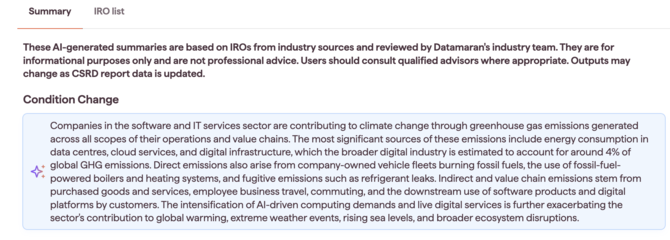
Use this summary to:
- Sense-check whether your current IRO coverage matches common industry disclosure patterns
- Prepare for stakeholder discussions with a clear, topic-specific narrative
- Identify areas where your long list may need strengthening
Proposed IROs section
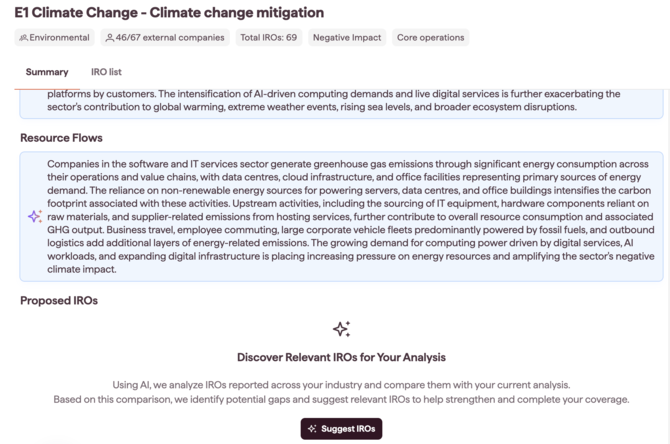
Within the Summary tab, the Proposed IROs section helps you generate suggested IROs based on the selected topic or subtopic and value stream.
We analyse IROs commonly reported across your selected industries and compare them to your current analysis. Based on this comparison, we highlight potential gaps and suggest relevant IROs to help strengthen and complete your coverage.
Generating Proposed IROs (Suggest IROs)
- In the Summary tab, scroll to Proposed IROs.
- Click Suggest IROs.
Adding a suggested IRO to your IRO long list
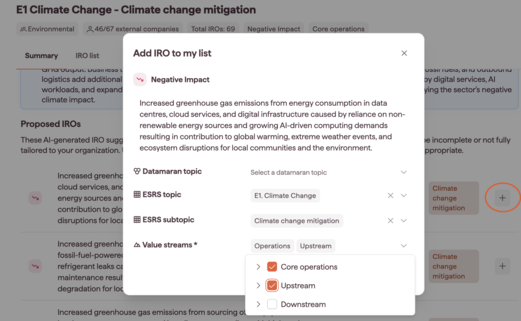
- In Proposed IROs, find an IRO you want to include.
- Click the plus (+) icon.
- In the pop-up:
- (Optional) Assign a Datamaran topic. If you leave this blank, the system maps it automatically.
- Select a Value stream. You can choose multiple sub-streams if relevant.
- Click Save.
The IRO is now included in your IRO long list.
Using the IRO list tab
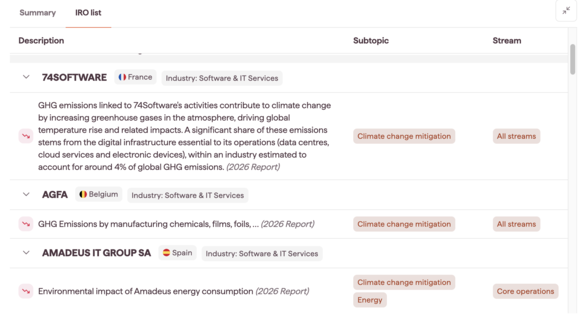
Use the IRO list tab to review the IROs associated with the topic or subtopic you are analysing. This helps you validate what you already have before generating or adding new Proposed IROs.
Notes on how this feature is designed
- Peer benchmarking is organised by industry, not by individual company comparisons.
- The feature uses LLMs to support summarisation and tailored suggestions, so you can move faster.